
Best Customer Journey Analytics Use Cases Driving Growth in 2026

.png)
The customer journey used to be simple: they clicked, they bought, they left.
Now? It’s a mess.
- In B2B: A dev tries your API, a PM reads your docs, and a CFO signs the contract three months later.
- In B2C: A shopper clicks an Instagram ad on mobile, browses on a laptop, and buys in-store.
In reality, your user data is messy. Your marketing events are in GA4, your product events are in Segment, and the actual revenue data, the "truth", is locked in Salesforce or Stripe. Trying to join these tables in a legacy analytics tool usually results in a CSV export nightmare or a Jira ticket for data engineering.
The fix isn't "more tools." It's warehouse-first solution.
Instead of copying data to a vendor, it sits directly on top of your data warehouse (e.g.: Snowflake, BigQuery, Databricks, Clickhouse, etc.). They see everything your warehouse sees.
Here are 5 ways teams are using this tech to actually grow in 2026.
1. The B2B "account health" join
The Pain Point:
Standard analytics tools are great for tracking users (user_id), but terrible at tracking accounts (org_id). In B2B, a "healthy" DAU count means nothing if the key decision-maker hasn't logged in for 30 days.
The Use Case:
You need to join your Product Event Stream with your CRM dimension tables to create a composite health score.
- "Show me all accounts with ARR > $50k where aggregate active usage has dropped by 20% MoM."
- Solution: Because a warehouse-native tool connects directly to the data warehouse, it treats your CRM data (Contract Value, Renewal Date) as just another table. You can segment event streams by these static fields instantly without building complex ETL pipelines.
2. True multi-touch attribution (LTV > CAC)
The Pain Point:
You know your CAC (Cost of Acquisition) from ad platforms. But you don't know the LTV (Lifetime Value) of those specific cohorts because that data lives in your payment gateway, not your ad manager.
The Use Case:
Connect the Source (Marketing) to the Outcome (Net Revenue).
- You want to compare the 6-month retention of users acquired via "Paid Social" vs. "Organic Search."
- The "Aha": You often find that while paid channels bring in cheaper leads, they churn 3x faster. The warehouse-native approach lets you query
usersjoined withtransactionsto see Net Profitability per Channel, not just conversion rates.
3. The "broken funnel" drill-down
The Pain Point:
You see a drop-off at Step 3 of your onboarding. In a traditional tool, you can see that it happened. To find out why, you often have to export the raw data to SQL to check for edge cases (e.g., "Is it only happening on Android 14?").
The Use Case:
High-cardinality segmentation on the fly.
- Analysis: Build a funnel:
Page Visit->Sign-up->Trial Started. - Drill-Down: Group the drop-off step by every available property:
Browser Version,Error_Log_Message, orUser_Role. - Find: You realize the drop-off is almost exclusively users with the role
Viewerwho physically cannot see the "Invite" button. You fix the UX to hide that step for them.

4. Feature impact analysis (The "stickiness" check)
The Pain Point:
You just shipped a new feature. Is it driving retention, or is it just a distraction?
The Use Case:
Correlation analysis via Cohorts.
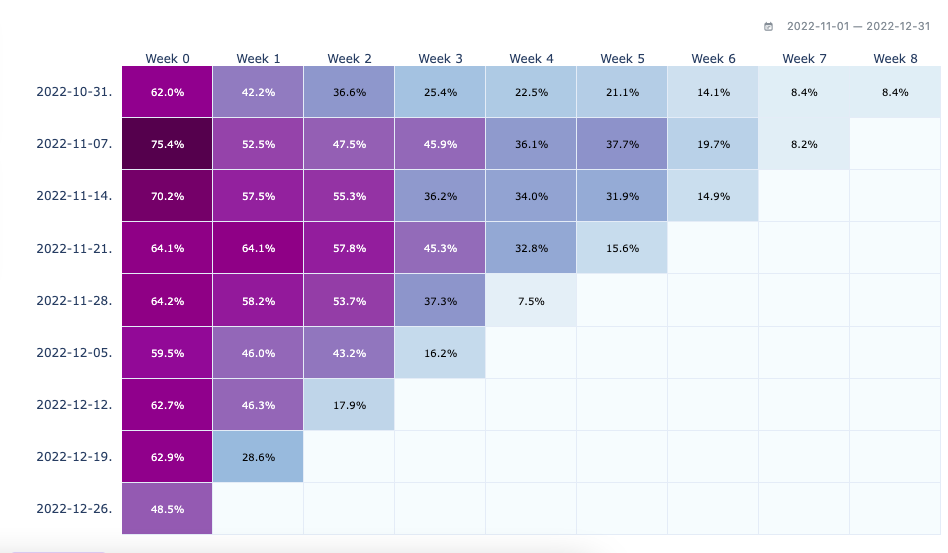
- Question: "Does using the new 'Bulk Edit' feature within the first 7 days correlate with higher Week 4 retention?"
- Setup: Create two cohorts:
- Exposed Group: Users who performed
Clicked Bulk Edit. - Control Group: Users who didn't.
- Exposed Group: Users who performed
- Result: If the Exposed Group has a retention curve that flattens at 40% while the Control Group drops to 10%, you have quantitative proof of product value.
5. Compliance & Governance
The Pain Point:
Your Legal/Security team hates it when you send PII (email, IP, device ID) to third-party vendors. It creates GDPR/HIPAA liability.
The Use Case:
Analyze sensitive data without moving it.
- The Architecture: In a Warehouse-Native setup, the data stays in your VPC. The analytics tool sends a query to your warehouse and only receives the aggregate results (the numbers for the chart) back. PII never leaves your control.
- You get to analyze the full customer journey, even for sensitive industries like HealthTech or Fintech without fighting your InfoSec team.
Summary
For product and data teams in 2026, the goal is speed to insight.
If you have to ask a Data Engineer to write a SQL query every time you want to check a funnel, you’re too slow. If you have to wait for an ETL job to sync data to an external tool, you’re looking at yesterday’s news.
This is where Mitzu bridges the gap. It gives product managers the visual interface they need, while respecting the data team’s architecture (the warehouse as the source of truth).
Unbeatable solution for all of your analytics needs
Get started with Mitzu for free and power your teams with data!
.jpg)


